Images: colour, portraits, artifacts & icons
Contents
The texture format itself is architecture §8. This page covers what the art needs beyond decoding, and the image exports stargazer and chaldea use, with the checks behind them. The tools are in research/.
1 Color: the texels are linear
The stored values are linear light, not display-ready sRGB. Shown as-is they look dark, with crushed shadows: 20% of Karma's portrait sits at or below 8/255. The textures stage converts them the way the game does on screen. It isn't a look or a grade, and it isn't HDR: the game has no HDR output.
What the parser does. texture.decode (src/afkj_extract/formats/texture.py)
applies the sRGB transfer function from IEC 61966-2-1 (_srgb_encode) to R, G, and B
through a 256-entry lookup table (SRGB_RGBA, applied with Pillow Image.point). Alpha is
left untouched. The output is ordinary sRGB PNG, so it looks right in any app, including after copy-paste, which
strips color profiles. --linear skips the step.
It is the standard transform. This is the encode a GPU applies when writing to an sRGB
framebuffer, the last step of every Linear-color-space Unity game. research/srgb_equivalence.py
compares the table level by level:
| Reference | Result vs the parser's table |
|---|---|
URP LinearToSRGB (Color.hlsl, the game's render pipeline) | identical, 256/256 levels |
UnityCG LinearToGammaSpace | identical, 256/256 levels |
ICC route: assign the studio's own sRGB Gamut with Linear Transfer profile (from the app's
bgmbg.jpg), convert to sRGB (LittleCMS, relative colorimetric) | within ±1 on 4/256 levels (rounding) |
The ICC row is the manual "add the color profile, then export as sRGB" workflow. Tagging a PNG with the linear profile instead would also display correctly in color-managed apps, but the tag is lost on paste and in many upload paths, so the parser bakes the encode in.
Why the texels are linear. Evidence, all read-only from 1.6.11:
- Engine:
PlayerSettings.m_ActiveColorSpace = 1(Linear),m_ColorGamuts = [sRGB],useHDRDisplay = false(appglobalgamemanagers). - Texture creation: the icon cache that holds these images is created in Lua as
UnityEngine.Texture2D.New(w, h, fmt, false, true), i.e.linear = true, so samples get no sRGB decode (Src/game_base.luae,IconCacheTexture*Impl, all three backends). The booleans are bytecode ops, not constants;tools/luadis.pyshows them. - Shader: the project's own
UI/Default(resources.assets, Metal) passes the texel through (tex × vertexColor, premultiplied out) with no color math. No gamma-space UI pass exists; UI draws via a stackedUICamerainto the linear pipeline, which is sRGB-encoded for display. - Studio convention: bundled UI sprite atlases are also non-sRGB
(
m_ColorSpace = 0, while 3D diffuse maps are 1), and the app's nativebgmbg.jpgcarries the linear-transfer profile above. - Non-icon art (tavern full-body art,
ui/imagebackgrounds) loads through a C# path whose texture flag isn't visible. Its raw statistics match the proven-linear portraits (median luma 0.07–0.20 vs 0.27; display-ready art would be brighter), so it is treated the same way.
Checked against the game. Two in-game screenshots of Karma's hero card are kept as
reference: docs/img/color/sample1.png (198×294, tagged
Display) and docs/img/color/sample2.png (163×304, tagged
Display P3). Both are Retina captures (144 dpi) from the macOS build. They aren't a clean match for the
asset: the game scales the portrait (about 1.36× and 1.14×), crops it, and draws a frame, background, icons, and a
name banner over it. research/color_screencheck.py handles that:
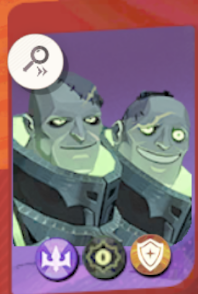
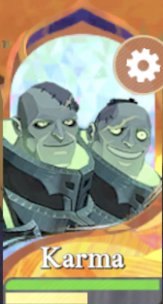
- Converts each screenshot to sRGB through its embedded display profile.
- Finds the portrait's scale and offset by matching edges of the raw decode, so the fit favors neither hypothesis.
- Compares only pixels opaque in both, using medians so overlays count as outliers.
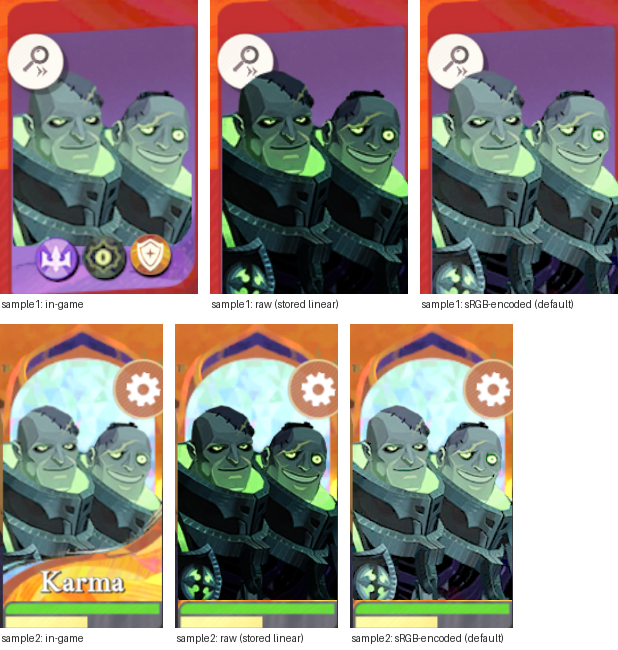
| Screenshot | Fit (scale, offset) | Pixels | sRGB-encoded: median error | Raw: median error |
|---|---|---|---|---|
sample1.png | 1.36×1.37 at (−15, −34) | 35.6k | 4/255 (64% within 10) | 68/255 (2% within 10) |
sample2.png | 1.14×1.13 at (−20, −4) | 26.5k | 4/255 (63% within 10) | 69/255 (2% within 10) |
The script also reports a hypothesis-free curve: for each band of stored values, the median value the game actually put on screen. Both screenshots follow the sRGB curve, not the identity:
| Stored | sRGB predicts | Raw predicts | sample1 screen | sample2 screen |
|---|---|---|---|---|
| 0–15 | 50 | 8 | 62 | 74 |
| 16–31 | 86 | 24 | 88 | 89 |
| 32–47 | 110 | 40 | 110 | 111 |
| 48–63 | 129 | 56 | 128 | 129 |
| 80–95 | 159 | 88 | 157 | 157 |
| 128–143 | 193 | 136 | 192 | 191 |
| 192–207 | 229 | 200 | 219 | 216 |
| 240–255 | 252 | 248 | 252 | 252 |
Across stored values 16–175, most of the image, both screenshots are within 4 of the sRGB prediction. Two small deviations remain, and neither is explained by a different curve. The darkest band reads brighter in-game (62–74 vs 50), most likely because the GPU decodes ASTC with more precision than the parser's 8-bit decoder, and the encode magnifies that most near black. The highlight bands (176–239, a small share of pixels: eye glow and rim light) read 5–13 lower, most likely softened by the game's resampling and the card overlays.
Checked against the GPU. On Apple silicon the GPU decodes ASTC in hardware,
exactly as the game does, so it is the ground truth for what reaches the screen. research/gpudecode.swift
uploads a texture's raw blocks as a native .astc_6x6_ldr texture (the same non-sRGB format as the
game's linear = true texture), reads it back, and also writes it through an rgba8Unorm_srgb
target for the hardware sRGB encode. research/portrait_gpu_check.py drives it. Over 130 hero portraits
(Apple M4, 2026-09-17):
| Compared | Exact | Within ±1 | Mean / max difference |
|---|---|---|---|
| Our decoder (texture2ddecoder) vs GPU decode | 97.6% | 100% | 0.03 / 1 |
| Exported PNG vs GPU decode + sRGB encode | 87.5% | 97.4% | 0.18 / 7 |
The remaining gap is precision, not a different curve. The decoder returns 8-bit texels and the table encodes those, while the GPU encodes its higher-precision decode, which differs most near black. A bit-exact alternative on macOS would be to decode through the GPU itself.
Caveats. The encode is exact for opaque pixels. The game blends semi-transparent edges in linear light, so compositing the PNG over something in an image editor differs slightly at soft edges. Very dark gradients can band a little more than on-device, for the same 8-bit reason as above. --linear writes the stored values untouched, e.g. for re-importing into a linear-workflow tool.
2 Finding a hero's art
Art is never filed under a hero's English name. Two internal keys from the Unit table are used
instead: the numeric ID (for portraits) and the codename in the row's
Name field (for everything else). Karma, for example, is #132 / doublehead.
game.load_heroes resolves names like this:
Unit row 132    DisplayName "喀尔马", Name "doublehead", IconSquare, UltIconSquare, …
  text_key      xxHash64("喀尔马") -> 2903921519077990255
en.json -> "Karma"DisplayNameis raw Simplified Chinese in this build, not a locale key, so the English name isLanguageDbEN[text_key(DisplayName)], the game's own lookup (architecture §6). A hash-valuedDisplayName, as in other builds, is used as the key directly.- Only
UnitType == 1rows are playable (131 of 923). The rest are NPC, monster, and story variants, and many reuse a hero's name: "Hewynn" matches 3 rows. Some also reuse another hero's icon (row 101 points atspui_herohead_74), so the row's own icon paths are the source of truth rather thanherohead_<ID>. - Matching English text back to Chinese instead (the first approach) is ambiguous: dialogue reuses a name's Chinese text, so "Hogan" also matched "Call me Hogan." The key lookup has one answer.
Where a hero's art lives, under ui/icon/:
| Folder | File | What |
|---|---|---|
hero/ | spui_herohead_<ID>[_s1].png | roster portrait card (the row's IconSquare), plus skins |
heroult/ | spui_herohead_<ID>_ult[_s1].png | tall ultimate portrait (UltIconSquare) |
tavern/tavern_up_<code>/ | spui_tavern_hero_timeline_<code>.png | largest full-body art (1334²), plus the rate-up banner art |
herogif/ | spui_herohead_<code>_animated.png | a flipbook sheet (5×5 frames of 200²), not a static portrait |
heroskin/ | spui_heroskinhead_<code>_s1.png, …hero_show_<code>… | skin heads, skin show art, and their _mask alpha masks |
| others | …_<code>.png | soulstone, exclusive weapon, skill, rate-up tabs, mall, tavern letter |
stages.textures.hero_art_filter matches a file to a hero if (1) the Unit row names it, (2) it's a variant of the
row's portrait (spui_herohead_132_…), or (3) its name ends in the codename, ignoring
_s1/_mask/_animated suffixes. Matching only the final position matters: as a
plain substring or token, the generic codenames claim hundreds of unrelated files. archer would take
the class gear item_sys_archer_head_r7 and mask the avatar parts
icon_avatar_mask_29. mask (Ravion) is also a suffix, so after another codename it's
treated as one (hero_show_captain_mask belongs to captain). Measured over all playable
heroes against plain token matching, the rule drops 440 hits: class gear, avatar parts, quest items
(item_quest_shemira_horse), and other heroes' skin masks. The cost is a few hero-themed extras it
misses: emote GIFs (spui_emoji_gif_faye_1), shard items (item_sys_fairygirl_fragment), and
a stray hero/spui_nara_68_herohead.png. A handful of unrelated …_mask files still match
Ravion. Use --textures for anything the filter misses.
3 Art in Unity bundles
The Addressables bundles (aa/iOS/*.lpak, ~6.6k packs, hashed names) are read only by the
research/ tools, not by the extractor's stages. Hero portraits don't need them: the loose
ui/icon/hero/ path above is the complete set. The catalog lists no portrait assets, and every bundled
asset for Karma is 3D model, animation, FX or timeline. Five portraits (heroes 1, 5, 6, 17, 22) also appear as
copies packed into UI atlases for particular screens, some trimmed (144×246 and up). What the bundles
do hold is the UI chrome: every icon, frame and glyph lives in Unity SpriteAtlases there (section
8.3). Verified read-only on 1.6.11:
- An
.lpakis several bundles back to back. 6,346 of the 6,871 packs hold more than one UnityFS bundle (tiny_asset_bundles_*hold ~170 each; 251,861 bundles across the non-VT packs of both copies). Each header's big-endian total-size field, right after the signature, format version and two NUL-terminated version strings, gives the next bundle's offset.UnityPy.load(path)reads only the first, so split the file and load each slice. Before this was known, 111 of the catalog's 359 atlases,Commonamong them, looked absent. - Container over app. The app bundle's
Data/Raw/aa/iOS/has 280 packs (913 MB). The container's same-named packs are newer (the downloaded updates), and a pack can change content between the two (pre_install_unmanaged_assets: 141 vs 132 bundles, differentCommonatlas hash). Read the container's copy when both exist. Never mix offsets between the two copies of a pack. - Engine version is stripped from the UnityFS headers (
5.x.x/0.0.0), so UnityPy refuses them until given one:UnityPy.config.FALLBACK_UNITY_VERSION = "2021.3.48f1"(from the app'sData/globalgamemanagers). - Catalog:
aa/catalog.bundleholds oneTextAssetnamedcatalog, an ~80 MB FlatBuffers blob with the asset paths in plain text (character/hero/pbsc_char_hero_<code>.prefab,ui/sprites/common.spriteatlasv2, …), so it lists what exists without opening the packs.LpakCatalog.iOS.binnames the top-level packs but has no plain-text asset paths. - The
prgroup_*_VT_*.lpakpacks are virtual-texture tiles for the maps and lighting, not UI.
Reading a pack, the minimal correct way (what research/atlas_sprites.py does):
import struct, UnityPy
UnityPy.config.FALLBACK_UNITY_VERSION = "2021.3.48f1"

def bundles(data):                         # an .lpak -> its UnityFS bundles
    off = 0
    while off < len(data) and data[off:off + 8] == b"UnityFS\x00":
        p = off + 12                       # signature (8) + u32 format version
        for _ in range(2):                 # engine version, revision: NUL-terminated
            p = data.index(b"\x00", p) + 1
        size = struct.unpack_from(">q", data, p)[0]   # big-endian total size of this bundle
        yield data[off:off + size]
        off += size

data = open(container_path, "rb").read()   # the container's copy, not the app's
for blob in bundles(data):
    env = UnityPy.load(blob)               # one bundle at a time; skip -var-0.75- atlas bundles (8.3)
    for obj in env.objects:
        if obj.type.name == "Sprite":
            img = obj.read().image         # linear texels: apply texture.SRGB_RGBA before saving
4 UI sprites (icons, frames, glyphs)
Class, faction, rarity and damage-type icons are sprites in SpriteAtlases, not loose files. The tables name them
by sprite path: Job.Icon is UI/Sprites/Common/spui_hero_job_tank_s.png,
UnitRarity.Icon is spui_hero_rarity_s.png, and UnitTag lists the faction
icons. The paths are their source locations; at runtime they're looked up in the Common atlas. The
catalog lists 359 atlases. research/atlas_sprites.py indexes 16,810 sprites (12 px and up, full-size
variants) from 352 of them; the other 7 have none (Job is an empty stub, the rest are activity
atlases). The tool matches a folder of images against the index and dumps sprites by name (all packs ~25 min;
--packs narrows it to seconds).
- Pages are linear (
Texture2D.m_ColorSpace 0), like the loose textures, so a sprite needs the same sRGB encode (section 1) to look as it does in game. Measured on the six class icons against stargazer's copies: mean shift −36 to −53 levels raw, +0.7 to +3.3 encoded. - Variants: each atlas ships a full-size page set (texture names
sactx-N-2048x2048-…-var-1.00-#N) and a downscaled one (-var-0.75-, 1536²) in another bundle with the same internal CAB name. UnityPy decodes the 0.75 sprites blank (it doesn't rescale their rects), and loading both variants into one environment lets one shadow the other's.resS. Use the 1.00 bundle, alone or with its own pack. - Compression: the
Commonpages are ASTC 5×5 (Unity format 49). At 44 px that shows as block tiles in busy backgrounds (section 6.3). - Where they are:
Commonis in the container'spre_install_unmanaged_assets_aa_module_GeneralRes.lpak(1.00 variant at offset 3,303,745);Battle_Readyis innewbie_asset_bundles_aa_module_GeneralRes_003.lpak. TheJobatlas is an empty stub (0 packed sprites): the class icons are inCommon.
5 Portrait export
The portraits stage (--only portraits) exports every hero's roster portrait under
stargazer's file names, the set stargazer's src/assets/images/character/ and the import's
calibration (calibration/) use. It replaces the hand-maintained portraits from earlier extractions.
5.1 What it writes
out/images/heroes/             full runs replace; filtered runs preserve other heroes
  <slug>.png                   one per hero: 180×248 RGBA, sRGB-encoded, no ICC profile or metadata
  alt/<slug>_alt[N].png        skin portraits, the import's costume references (never copy into stargazer)
  manifest.csv                 slug, file, English name, unit ID, codename, kind, portrait + alternate sources,
in_reference (yes/no with --reference, else empty)- Heroes: every playable unit (
UnitType == 1) with an English name (HeroNameXXX, a dev placeholder, has none). The image is the file the row'sIconSquarenames, which isspui_herohead_<ID>except where a unit reuses another's (Lorsan's second unit, 101 → 74; both write onelorsan.png). Art this install has not downloaded is reported in the summary and skipped, unless heroes were named explicitly. - Names:
afkj_common.rules.assign_slugs, the feed's rule:hero_slugof the game's English name, a port of afkj-data-viewer'stoHeroSlug: lowercase, drop apostrophes, and join the rest with hyphens ("Elijah & Lailah" →elijah-lailah). This reproduces all 127 of stargazer's names. - Companions: stargazer also shows non-hero units;
COMPANION_PORTRAITSmapszanie-turret→ Unit 5021 (spui_herohead_5021). Add new ones there. - Alternates:
<portrait>_s<N>.pngskins, then a_storyvariant, named_alt,_alt2, …; a variant pixel-identical to the portrait is skipped (Indris's_story). In build 14368, 58 heroes have exactly one skin. Not alternates:ui/icon/hero/child/holds the separate members of multi-unit heroes (Elijah and Lailah, plus skins; Phraesto's demon), andspui_nara_68_herohead.pngis a near-duplicate of Nara's portrait. - Chaldea: the alternates are the costume references of stargazer's match-screenshot import.
Each goes into chaldea's
dist/img/import/skin/as<slug>-alt[N].png, bytes unchanged; then, in this repo'scalibration/, npm run references writes its WebP andskins.jsonthere, and SET=baseline npm run check judges it (calibration/README.md). Stargazer fetches them from chaldea's site, so it needs no change.research/skin_check.py chaldealists the alternates chaldea lacks;research/skin_check.py cdn, the skin art the CDN's live build adds before the game downloads it. - Reference check: with --reference DIR, the manifest's
in_referencecolumn marks heroes without a same-named file inDIRasno(new and unreleased heroes), and the summary lists them. Every portrait stays in one folder, named by the feed's slug. --hero limits the run; --linear keeps the stored values. - Excluded:
EXCLUDED_HEROES(by Unit ID) keeps Guywin and Joey (story soldiers 39/40) and Hogan (38, CN-only), none of them in the public game, out of every run;config.json's permanentblocklistkeeps the same three out of the feed. Naming one with --hero is an error.tools/unreleased_skills.pyskips them too.
5.2 Replacing stargazer's portraits
Run these before a bulk replace. None of them modify stargazer or chaldea.
| Check | Tool | Result 2026-09-17 (1.6.11, 127 portraits) |
|---|---|---|
| Art, framing, colour vs the current files | research/portrait_audit.py |
108 same (4 byte-identical); 19 flagged (below) |
| What the build ships (stargazer's two WebP recipes) | research/portrait_webp_check.mjs |
Same-art heroes: median 4.2/255 (max 8.6) on the roster thumbnail, visually identical |
| Match-screenshot import (the result-screen checker on chaldea's 4 labelled sets) | research/portrait_import_check.py |
0 of 254 labelled hero cells changed, accuracy identical; 1 of 274 unlabelled changed (a coin flip on a damage-stats screen, flagged for review both times); Rolan/Perseus leads −0.05 to −0.07, still correct |
| Ground truth: which set matches the game | research/portrait_gpu_check.py |
On the 108 same-art heroes, the export is 96.1% within ±1 of the GPU, stargazer's 45.8% |
| Stargazer's own gates, with the portraits copied into a scratch copy | npx vitest run,
npx vite build | 1184/1184 pass; build emits both WebP variants for every portrait |
The 19 flagged in 2026-09-17, all resolved by inspection:
- Content: Reinier (new art), Berial (the old file was about 25 luma levels too dark), Saida (about 11 too light).
- Game reframed (like Eryndor): Scarlita, Rolan, Kordan, Fay, Phraesto, Shadewing.
- Stargazer custom crops (non-standard sizes), which a replace reverts to the game's framing: Ludovic, Sinbad, Lenya, Florabelle (zoomed in), Temesia, Soren, Alsa (taller canvases).
- Resampling edges only: Atalanta, Lamentis, Lorsan.
5.3 Stargazer's earlier portraits
Stargazer's portraits from before 2026-09-17 came from a friend's earlier extraction (Sep 2025).
- Colour handling was mixed. 85 stored linear pixels with an embedded ICC profile named
linear, 39 were baked to sRGB, and 2 were tagged "GIMP built-in sRGB". All of them displayed correctly, and sharp (the build's converter) turns each into correct sRGB WebP. - They were older compressions. Differences from the export sit only on line art and fine detail, and flat areas match: two lossy encodes of the same art. Aliceth and Perseus, whose textures were not re-encoded since, matched the export pixel for pixel, so the two pipelines agree on identical input.
- 45 files carried Photoshop metadata bloat: an identical 1.87 MB
photoshop:DocumentAncestorslist (33,350 IDs); those files were 85.2 MB of the folder's 93 MB.research/strip_ps_ancestors.pyremoves just that element, verified lossless (pixels, ICC, every other chunk and the built WebPs byte-identical). The build never shipped it. In git history the old portraits take about 12 MB of stargazer's 42 MB.gitafter compression; removing them would need a full history rewrite (all 865 commits), which was judged not worth it.
6 Artifact & icon export
The artifacts stage (--only artifacts) exports the artifact images stargazer and chaldea
show, under their file names. Stargazer's other icons have no stage: they are atlas sprites (section 4), and the
game's copies turned out no better than stargazer's (10.3). As of 2026-09-18 nothing here needed replacing; the
stage's use is the next season's artifacts.
6.1 What it writes
out/images/artifacts/          rebuilt from scratch on every run
  <slug>.png                   512×512 RGBA, sRGB-encoded: the permanent six -> stargazer src/assets/images/artifact/,
                               the current season's set -> chaldea dist/img/seasonal/artifact/
  manifest.csv                 slug, file, English name, Fairy ID, set (pre-season | season), SeasonType, FairyType,
                               source texture
Both sets share one folder, as they share one file in the feed; tools/seasonal_icons.py
takes the rows whose set is season. Slugs are afkj_common.rules.assign_slugs's.
- Set: afkj-data-viewer's rule. Permanent artifacts are the
Fairyrows withSeasonType 1andFairyType 1(6). The current season is every row whoseSeasonTypeequals the highest onlineSeasonrow above 100 (current_season; 107, shown in game as "Season 6", 12 rows). The otherFairyTypes aren't in stargazer's list. Type 2 rows (Golden Blooms, …) use item icons. Type 3 rows (Deep Infiltration, Reinier's Grasp, …) mostly reusemn_prepare_1. Type 4 rows copy the permanent spells and past seasons' spells, and the past seasons' icons are no longer on disk. - Image: the row's
IconPrepare, the 512×512 square card (ui/icon/fairy/icon_sys_fairy_mn_prepare_N,…_ep7_prepare_N).Iconis a smaller pendant cut-out (277×382 for Awakening), which stargazer doesn't use. - Names:
artifact_slug: the English name (DisplayNameviatext_key) without its " Spell" suffix, throughhero_slug;fairy-<id>without a name,-<id>appended on a clash. This reproduces all 6 stargazer and all 12 chaldea names. - Chaldea's formats: its
.webpfiles are sharpwebp({quality: 82})at full size, byte-identical to the published ones. Nothing references its.aviffiles.
Stats (found 2026-09-24): the feed carries them as each artifact's statBonuses, and
stargazer's npm run import:structure turns them into its {id, name, season, stats} files
(integrations §2.2). The stats are Config/FairyLevel.luae rows
[FairyID, Level], AttrParam1–4/AttrValue1–4 at the highest level (10 permanent,
30 seasonal). Codes map as ATK/HP/DEF PR → atk/hp/def, ARM/MR PR → phys-def/magic-def, HAST haste,
ATKHAST atk-spd, PT def-penetration, HEAL vitality, LFS life-drain, BLOCK ranged-def, CRIT crit (names from
UnitAttr's English Tips). This reproduces stargazer's 6 permanent files byte for byte. Seasonal ids
are 7 onward in FairyID order, as season 107's 7–18 were, and season is SeasonType − 100. Season 108's Soulshock
brings Crit (stargazer's crit key). The skill text comes from the feed through import:seasonal.
6.2 Checks against stargazer and chaldea
The portrait tools cover artifacts too (section 5.2). None of them modify stargazer or chaldea.
| Check | Tool | Permanent 6 vs stargazer | Season 12 vs chaldea |
|---|---|---|---|
| Art, framing, colour | portrait_audit.py |
all same: mean 0.9–1.4, shift ±0.1 | all same: mean 0.3–0.8 |
| Shipped WebP (w100 q80; chaldea q82) | portrait_webp_check.mjs … artifacts |
mean 1.9–2.8, no pixel over 16 | 1.8–2.4; hosted 1.0–1.5 |
| Match-screenshot import | portrait_import_check.py --into artifact --seasonal DIR |
0 changed readings on all 4 sets, artifact accuracy unchanged (13/30, 6/10, 6/10), leads ±0.01 | |
| GPU ground truth | portrait_gpu_check.py |
export mean 0.28 (max 7), stargazer 1.43 (max 110) | export 0.30 (7), chaldea 0.48 (12) |
The export matches the GPU better, but that means it matches this client's texture, which is ASTC 6×6.
Hard edges in these flat-colour cards get 6×6 blocks of the wrong colour, and the game draws them too. Stargazer's
permanent six came from Figma (2026-06-04) and don't have them: up to about 5,900 pixels per image differ by more
than 20 levels, clustered on the block grid. So stargazer's are the cleaner copies; at the shipped 100 px the
difference averages out to about 2 levels. Chaldea's season set has the same blocks as the export and differs by
under a level. Stargazer's image credits (src/assets/images/README.md) name Yaphalla and the official
AFK Journey UGC Assets GDrive, which fits its art being cleaner and larger than the client's textures.
6.3 Stargazer's icons
All 21 files in stargazer's src/assets/images/icons/ were matched against every atlas sprite
(research/atlas_sprites.py, section 4). 20 are game art:
| Stargazer | Game sprite | Named by | Game size / stargazer's | Verdict |
|---|---|---|---|---|
class-* (6) | Common/spui_hero_job_<job>_s (Marksman = archer,
Rogue = ranger, Warrior = soldier); 94 px Equip/spui_heroequip_job_<job>_s |
Job.Icon, .EpEquipEntranceIcon | 44² / 44² | keep: the atlas copy shows ASTC 5×5 tiles; shipped WebP would differ by 5–9 levels (5–14% of pixels over 16) |
damage-magic, -physical | spui_icon_harmtype_02,
spui_icon_harmtype_01_common | game Lua | 32×34, 27×30 glyphs / 40² canvas | already the game's pixels (glyph at (4,4) and (6,5)); they were stored linear with an ICC profile named
linear, as the old portraits were, and are plain sRGB since 10.4; shipped WebP within 0.6 and 2.6
levels of the game sprite |
faction-* (7) | Common/spui_icon_battle_information_<race>_64
(human, orc, elf, undead, god, devil, void = Lightbearer … Dimensional) | UnitTag |
64² / 300² | keep: stargazer's are higher resolution |
level-a, level-s | Common/spui_hero_rarity_a, _s |
UnitRarity.Icon | 35² / 256² | keep |
bg-rare, bg-a, bg-s |
Common/spui_common_item_bg_hero_1/2/3 | game Lua | 119×167 / 232×328 | keep |
initial-energy matches nothing in the game (the nearest sprite is unrelated art). The comparison
sheets, the 8 same-size game icons under stargazer's names, and icons.csv from the 2026-09-18 run are
in out/artifacts-icons/.
6.4 One-time metadata clean-up of stargazer's images (2026-09-18)
Not a recurring step. Stargazer keeps its own artifact and icon art (10.2–10.3). Once, its
src/assets/images/ files were checked for the kind of bloat the old portraits had (9.3), and the
editor metadata was removed. Every file stayed the original image.
- What was found: nothing like the portraits. The whole folder carried 5.1 KB of non-pixel data (3.9 KB noise, 1.1 KB colour tags),
at most 1.8 KB in one file, and no version in git history had Photoshop's
DocumentAncestorslist.character/(the parser's export) and 18 of the 21 icons had none. - What was removed (9 files, 3,910 B): editor text (
Software: Figma on the 6 artifacts, Adobe ImageReady ondamage-magic), XMP editing history and IDs (Photoshop on the damage icons, Affinity onfaction-dimensional), andpHYs(72 dpi). All of them are chunk types that change no pixel, no display and no build output. - Then, by decision, the colour tags that change nothing (8 files, 856 B): the artifacts'
sRGB+gAMAandfaction-dimensional's sRGB profile (untagged already means sRGB), anddamage-magic'slinearprofile (every pixel is white, which is the same in linear and sRGB). Their image data (IDAT) is byte for byte the original. - Last, by decision,
damage-physicalwas converted, the one file whose tag mattered: its values were linear, so the tag couldn't simply be dropped. Its stored values are the game's linear sRGB texels, so the RGB went through the game's sRGB encode (the parser's LUT, as the portraits got), alpha untouched. That re-expressed 598 pixels, 239 of them under fully transparent pixels, and moved the display by at most 1 level. It's also slightly closer to the game's sprite than its old profile gave (mean 0.72 vs 0.84). Converting through its own profile instead would have kept the site's WebP byte-identical. - Result: all 154 PNGs in the folder have one form:
IHDR,IDAT,IEND, 8-bit RGBA, sRGB values, no metadata, the same as the parser's portrait exports. - Verified against the originals (stargazer
c0603609) after each step, and committed as0385982c: kept chunks identical and in order, pixels identical (exceptdamage-physical, as above). Stargazer's WebP output is byte-identical for 8 files;damage-physical's differs by a mean of 0.67 levels, 0% of pixels over 16. All 1184 tests pass and the build succeeds with the 9 files on HEAD.
Lessons, for any future clean-up (a first attempt went too far and was reverted):
- Stay in the folder asked for. The first attempt also stripped
public/(site icons, og:image), which was out of scope. - Don't re-encode or change pixel values unless the owner decides to; copy
IDATverbatim. A changed file is a new version, not the original. The first attempt converted the damage icons unasked; the finaldamage-physicalconversion was an explicit choice, made after comparing options. - Colour tags aren't noise. Noise is only
tEXt/zTXt/iTXt,pHYs,tIMEandeXIf. A colour tag may go only when it's display-neutral: an sRGB tag, or a profile on values it can't change (pure white). Check that stored and displayed pixels match before and after, and get it approved. Alinearprofile on real colours is load-bearing. - Read a profile's contents, not its name. Both damage icons carry a 488 B profile called
linearwith a linear curve, butdamage-magic's has sRGB primaries (the game's textures are linear sRGB) whiledamage-physical's, made a month later, has wider, roughly P3-like primaries: a mis-tag. It only goes unnoticed because the icon is near-white (≤1 level either way). - Linear values with a
linearprofile aren't the dark-portrait problem. That was the parser's raw export with no profile, about 68 levels off. Tagged files display correctly in browsers and in sharp:damage-physicalwould be only about 4 levels darker even if the tag were ignored, anddamage-magicis pure white, which is the same either way. - Stargazer's dev server reacts to file changes (vite-imagetools re-processes into
node_modules/.cache/imagetools, keyed by content), so edits go live in a running session. Scratch builds with a symlinkednode_moduleswrite there too. Intermediate versions left orphan entries (10 and 9), now removed. - Pillow re-embeds
info["icc_profile"]when saving an image made withconvert(). Only relevant if something is ever re-saved, which a clean-up shouldn't do. - Propose first, check against git HEAD, and let the owner decide.
research/png_audit.pylists what a PNG carries (read-only). The strip itself was a one-off, and its tool isn't kept.
Left as is, outside that folder: src/assets/rowan.gif (1 KB Photoshop XMP), and chaldea's seasonal
and phantimal PNG sources, which carry 8–15 KB EXIF blocks with embedded JPEG thumbnails (241 KB in all). The WebPs
chaldea serves carry no metadata.
6.5 Phantimal export and the Season 108 cutover (2026-09-23)
The phantimals stage (--only phantimals) exports the current season's Phantimal portraits
named by the feed's slugs, which are chaldea's names (dist/img/seasonal/phantimal/<slug>).
out/images/phantimals/         rebuilt from scratch on every run
  <slug>.png                   180×248 RGBA, sRGB-encoded      -> chaldea dist/img/seasonal/phantimal/
manifest.csv slug, file, English name, Unit ID, Camp, main/sub, codename, SeasonType, source texture- Set: Phantimals are internally
CampPet. Its rows (one perCamp) name this season's units byCampPetUnitID. In Season 108, Camp 5 also has aCampPetSubUnitID: Wedge of Matter (5120) fights with Wedge of Power (5078). The stage exports main and sub units, so there are 6 files. Season 107's rows (5111–5115) had no sub-unit. Chaldea's sixth file,nocturne-judicator(unit 3038,colossusdark), was added by hand. - Image: the unit's
IconSquare, the sameui/icon/hero/spui_herohead_Nart as hero portraits. Chaldea's six Season 107 files are this art, judged by eye. The raw pixel difference (mean 9–52) comes from their colour handling: they carrygAMAand EXIF.CampPetIconequalsIconSquareexcept in Camp 5, where it shows the sub-unit (3061). - Names:
hero_slugof the English name, which is also the feed's slug (crystal-beetle,wedge-of-power);phantimal-<id>without a name.
Season numbering. SeasonType 108 / ep8 textures is the eighth season
row. The game titles it "Season 7: Veil of Memories" (the first season was the untitled "Foundation Season"), and the
afkj-data-viewer's runbook called it Season 8. It opened 2026-09-23. The data landed in the 1.6.11 client (resource update of
2026-09-23) without a version bump.
What the cutover brought (run of 2026-09-23): 12 artifacts (Fairy 8001–8012,
icon_sys_fairy_ep8_prepare_N) and 6 Phantimal units, all on disk. There were 136 hero portraits. The 127
stargazer already has are byte-identical to its files. The 9 not in stargazer (then a not-in-reference/ folder, now the manifest's in_reference column) were guywin, joey and
hogan (as before; excluded since), 3 new live heroes (Enable true: Senea 139, Estrilda 142, Aster 147) and 3 unreleased
ones (Enable false, like Hogan: Thane 141, Tephesia 143, Grezhul 144). Baden (140, also disabled) has
no art on disk yet. Of the 58 skin alternates, 56 were byte-identical to chaldea's dist/img/import/skin;
Eryndor's and Rolan's were new, and chaldea took both on 2026-10-18.
Unreleased heroes' skills are withheld. For the 4 disabled new heroes, every skill
Description in the client is a placeholder, in the Chinese source and so in every locale:
在神秘力量的影响下… / "Under the influence of a mysterious power, you can't gather detailed information about
this character." Their buffs have no text either. Skill names are Chinese literals with no localization
(Tephesia's still carry the 不用翻译 "don't translate" marker). English exists for the hero name, three of the
four titles (Baden has none), faction, class and damage type. The per-level numbers are real: scaling, cooldown
and SArgs. tools/unreleased_skills.py writes these to
out/tools/unreleased-skills.html. The 3 released new heroes have full text.